
I Hate Pair Programming — But 140 Sessions With an AI Changes the Equation


What I learned about coding with an AI assistant — the good, the bad, and the “why did it take 3 attempts?”
I’ve always hated the term “pair programming.” It sounds like programming for people with only half a brain — not far from extreme programming, which I imagine is programming while bungee jumping. Two people, one keyboard? No thanks.
Then I accidentally racked up 140 chat sessions with an AI coding assistant.
One project. $4.90 total. 768 million tokens in. 3.3 million tokens out. These figures come directly from the AI tool’s session index — every chat logged with its cost, token count, and task description. And somewhere in that firehose of data, I realised something uncomfortable — I had been pair programming. Just not with the kind of partner I expected.
Here’s what 140 sessions taught me about the developer sitting next to me — who isn’t a person, but acts a lot like one. AI coding assistants can write code at astonishing speed, but they don’t reliably ask the causal questions behind that code. That job still belongs to the human in the loop.
The Partner Who Never Asks Questions
The first thing you notice about an AI pair programming partner: it never stops to ask “are you sure?” It never says “hold on, let me check if this will work first.” It just… goes.
The most expensive conversation in my dataset — $0.32, 1,389 messages, 47 edit attempts across 5 files — was about adding a native dialog to an iOS login screen. The AI tried three completely different architectures before finding one that worked:
- A plugin system approach — failed because the custom build script bypassed the plugin registration system
- A C interop approach — failed because of linker symbol issues with the custom Xcode project
- File-based IPC with a timer — eventually worked
Each approach was implemented fully before the AI discovered it didn’t work. It never asked “will this build pipeline support this approach?” before committing hundreds of messages to implementation.
And yet: this churn was still faster than doing it myself. The AI burned through three architectures in the time it would take me to evaluate one. Sure, a more thoughtful first approach would have been cheaper — but the speed makes the waste tolerable. It brute-forces solutions at a pace no human can match, and that alone shifts the cost-benefit calculus.
That said, the final working solution still had a bug. The AI created a dialog window as a local variable in Swift. When the function returned, the window was deallocated, and the dialog appeared on screen for a fraction of a second before disappearing — a “flash” that took 3 debug cycles to diagnose.
The AI wasn’t bad at code. In these sessions, it often matched solutions from documentation and examples without reliably validating object lifecycles, build pipelines, or architectural dependencies. It produced code that looked right before it had been tested against reality.
Then there’s the time I prompted the AI to add a “No Silent Fallbacks — HARD RULE” to its own instructions. Plain language, explicit, zero exceptions. Hours later, it discovered a dead silent fallback in the test reporting code — a feature that appeared to work but silently failed under certain conditions. The AI flagged the issue, then asked me which approach I wanted. The rule didn’t change how it operated — it only gave it another pattern to look for.
In this workflow, the AI could generate the correct policy without reliably behaving as if it mattered. A rule looked less like a behavioural constraint and more like another text pattern: it spotted the symptoms of a silent fallback without consistently acting on why they were dangerous.
At least in this project, that looked less like a one-off bug and more like a constraint of the current tool shape. We’re in a pattern-matching era, not a reasoning era. The AI excels at syntax because that’s densely represented in training data. It struggled with novel causal chains, because those require a model of the world the system doesn’t have. Recognising which bucket your task falls into is the difference between using it effectively and fighting it constantly.
The Partner With No Memory of the Last 5 Minutes
Stale Edits and the 17% Failure Rate
Here’s a quirk I didn’t expect: in this tool loop, the AI often didn’t re-read files before editing them. It would read a file, remember the content, make three edits to other files, run a build command — then edit the original file from memory. But the file had changed (its own edits, formatter auto-correction on save), so the edit failed.
In one heavy task, I counted 15+ failed edits from stale line numbers, identical search-and-replace blocks (a no-op), and code inserted in the wrong method body. Overall, about 17% of edit attempts failed and had to be retried.
Non-Deterministic Code Review
The same blind spot shows up in code review. I once asked the AI to review a test file and fix bugs — and instructed it to use separate subtasks so each one started with fresh context, with a hard stop at 1,000 subtasks. It created 17 sequential subtasks(~$0.38, 31M input tokens), each reviewing the same files. Each review found new bugs that previous ones missed. The chain stopped at 17 not because all bugs were found, but because each pass had a finite scope and the task ran out of instructions before coverage was complete.
In that review setup, the AI had no reliable mechanism to say “I’m done. Coverage is complete.” Fresh reads of the same file kept revealing different issues because attention was non-deterministic.
The 234:1 Context Tax
And then there’s the context problem. For every 1 token the AI generates, it consumes 234 tokens of context. Most of that is noise — full file reads, routine log entries, environment descriptions. A human scans test logs for anomalies in seconds. The AI sends every line back to the API as input on the next call. I calculated about $1.31 (26.5% of all costs) was pure waste — redundant context and full log dumps.
The Partner Who Loves Band-Aids
Some team members dig until they find root cause. Others apply a visible fix and move on. I am the first type. My AI partner is firmly in the second camp.
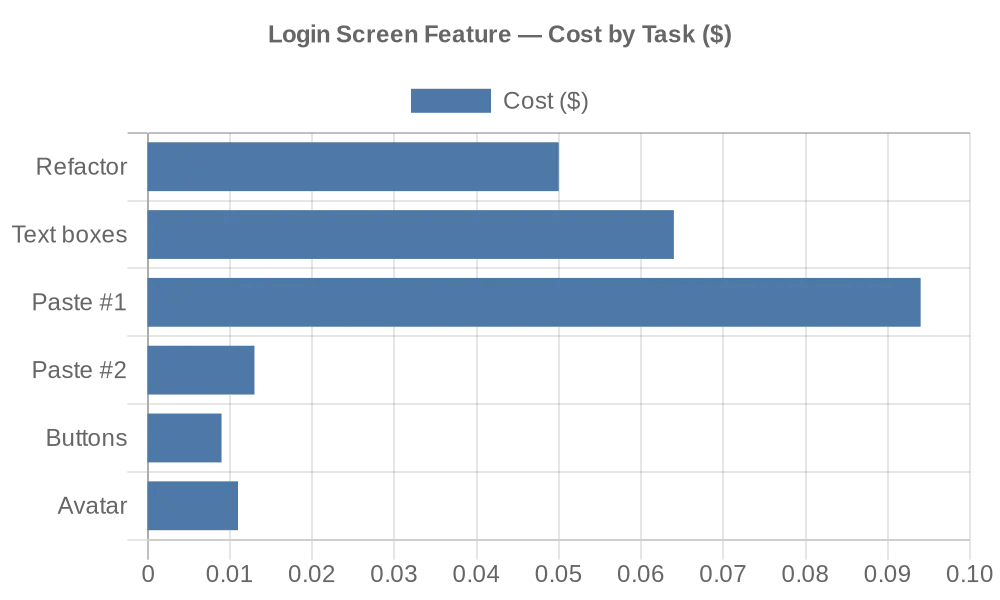
The iOS paste problem shows how stubborn the pattern can be. The user couldn’t paste into login fields on iOS. The AI’s first fix: open the keyboard programmatically on field focus. The user came back — still couldn’t paste. Second fix: add custom paste buttons to each field. The user came back again.
Two separate conversations, $0.10 combined, and the root cause was never found. The AI never asked “why doesn’t the native iOS paste gesture reach this UI framework’s text input?” It pattern-matched “can’t paste” → “open keyboard” → “add paste buttons” without ever tracing the causal chain.
This pattern repeated across the project:
| FEATURE | INITIAL COST | REWORK COST | RATIO |
|---|---|---|---|
| Screenshot storage | $0.07 | $0.23 | 3.26x |
| Login screen refactor | $0.05 | $0.19 | 3.80x |
The screenshot system shows what happens when you don’t catch it early. Initial approach: database table with foreign keys. Problem: screenshots were uploaded before the test report existed, so the foreign key was always null. The AI’s first fix: add a database migration. The user pushed back — “why is there a database table for screenshots?” The second approach: store screenshots as files in a UUID-named folder. The file path is the mapping. No database needed.
The first approach cost $0.07 to build and $0.23 to replace. That’s 3.26x more spent fixing than building. And the replacement only happened because the user questioned the design, not because the AI recognised the over-engineering.

A deeper example started with a simple request: “run a seven player 15 minute game.” When that test hit a script error — an object accessed after another player had claimed it — the AI’s first fix was a null check: if the object is gone, return silently. The error log went quiet. The fix shipped.
But the root cause — a race condition between concurrent player operations — was still there. I asked: “how do you know that null check isn’t hiding a real bug?” The AI acknowledged it was a band-aid, then tried: a return-type refactor so callers could propagate the failure, then an object-count comparison, then a container-check inference. Each was more sophisticated than the last. Each still relied on indirect evidence.
Only when I pointed to the authoritative source — the server’s game-state messages contain the exact object UUIDs consumed by each player — did the AI pivot and implement the correct solution on the first try. And even then, it found more inference patterns elsewhere and fixed those too. The cascade didn’t end until the authoritative data was identified. This was revealing — the AI was capable of deep, generalised fixes, but only once the human had traced the causal chain and pointed to the authoritative source.
How to Work With This Partner
After 140 sessions, I’ve developed a mental model of what this partner is good at and where it needs supervision.
What the AI genuinely excels at:
Can’t remember every grep flag? The AI does. Need to spot a linked library in a hex dump? It can. These tasks have clear surface signals and lots of examples to imitate.
- Syntax and boilerplate — it knows every language’s standard patterns
- Simple, well-scoped UI adjustments (padding, spacing, colours) — ~100% acceptance rate
- Finding syntax errors and type mismatches
- Generating test scaffolding
There’s a reason for these gaps you’ll notice below: the AI is trained on code from across the internet — elegant libraries, WordPress plugins, Stack Overflow snippets, abandoned side projects — and it has no intrinsic way to distinguish good code from bad. It learns what’s common, not what’s correct. Popularity and quality look the same to a statistical model. Even reference books disagree on conventions, so there’s no single authoritative source it could defer to.
What needs human oversight:
- Architecture decisions — verify assumptions before committing
- Memory and object lifecycle — it may know the rules without checking its own code against them
- Root-cause analysis — expect surface-level fixes unless you ask for the cause
- Multi-file changes — watch for stale state across files
- Completeness — require an explicit stopping condition
Practical tips I now use:
- Prefix every prompt with a meta-directive: “State your root-cause hypothesis. What else could this affect? Is there a simpler way?” — because the AI won’t ask these itself.
- Let the build and tests validate: Run compilation and automated tests after AI edits. The AI may leave stale code or introduce errors that a build won’t catch — but tests will.
- Filter log output before sending: Don’t rely on the AI to distinguish signal from noise in raw logs. For expensive operations, trim the input first.
- Use rules files to encode project-specific conventions — build commands, coding standards, deployment workflows. The real value is that rules persist across sessions, so you don’t have to repeat meta-prompts in every prompt. It won’t fix the band-aid pattern entirely, but it reduces the surface area for mistakes.
- Force re-reads after every edit cycle: The AI works from memory, not current state. After every edit cycle, force it to re-read files before the next edit. Stale line numbers and outdated content are the most common cause of failed edits.
- Don’t assume one pass is sufficient: The AI’s attention is non-deterministic — each pass over the same file may reveal different issues. Require an explicit stopping condition rather than assuming coverage is complete.
The rework rate across the project tells the story: 27.7% of non-test tasks were follow-up fixes. Simple, well-scoped work had ~100% acceptance. Anything requiring architectural decisions or multi-file changes had ~60% rework rate.
Your mileage will vary, but the boundary became clear: the AI was strongest when the task had obvious examples to imitate, and weakest when the task required choosing the right cause from several plausible ones.
From Writing Lines to Asking Questions
Every failure in this article traces back to a question the AI couldn’t ask. Every success traces back to a human who did — in the prompt.
The AI that couldn’t spot its own memory leak also wrote this article. That’s not a contradiction — it’s the whole point. The tool can be genuinely useful in one moment and confidently incomplete in the next. The difference is whether you supply the questions it can’t ask: validate assumptions, trace causal chains, verify completeness. The clearer your meta-prompts about those, the less you’ll rework.
AI coding assistants haven’t done away with human programmers. They’ve just changed what programmers do — from writing every line to asking the right questions.
This article is based on analysis of 140 real AI chat sessions across a single software project. The full analysis document covers 9 categories of AI coding patterns with quantified costs. Names, UUIDs, and specific code have been genericised, but the numbers are real.
Leave a Comment